The AL60 uses two concentric rings of RGB LEDs to display the time. Unlike a traditional clock with physical hands, the AL60 uses light to represent the hour, minute, and second positions.
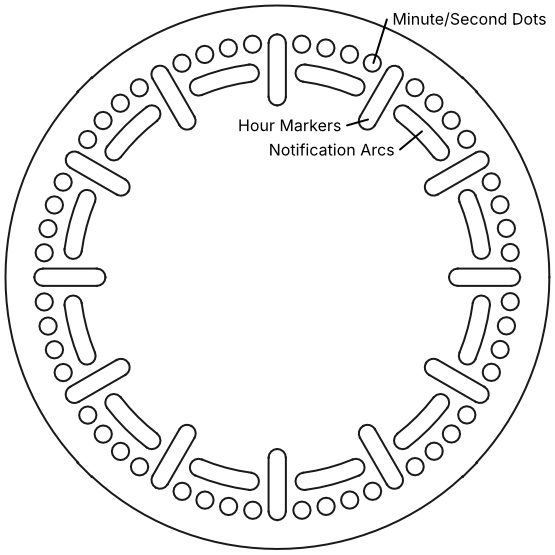
The Dual-Ring Layout
Section titled “The Dual-Ring Layout”Two LED rings are located behind the wooden face of the clock below translucent diffused dots, hour markers, and notification arcs:
- Outer Ring (60 LEDs): This ring is dedicated to representing Minutes and Seconds and consists of individual circles and the outer part of the hour markers. Each LED represents exactly one second or one minute of a full rotation.
- Inner Ring (48 LEDs): This ring is primarily used to represent the Hours in the inner part of the hour markers. This ring is also optionally used to display sensor information in the arcs between the hour markers.
Clock Display Modes
Section titled “Clock Display Modes”You can change how the clock looks by cycling through the built-in Clock Effects using the Mode button or the Web Interface:
- Clock (Default): Crisp, distinct points of coloured light for all hands - orange hour hand, cyan minute hand and white second hand.
- Clock (Fade): The second hand moves with a smooth fading effect between positions.
- Clock (Tail): The second hand moves with a smooth fading tail.
- Clock (Rainbow): All hands cycle through a spectrum of colours as they move.
- Clock (RGB): Uses a red (hour), green (minute) and blue (second) theme for the hands.
- Clock (Mono): A minimalist, single-colour look for the entire display.
Notification/Sensor Display Modes
Section titled “Notification/Sensor Display Modes”The AL60 can optionally display sensor or notification information on the arcs of the inner LED ring. Smart-home notifications are possible when integrated with Home Assistant, or the LEDs can show the following from the built-in sensors:
- Sensors: Dual Bars: Humidity (left) and temperature (right) starting from the 6 o'clock position (0% or -10ºC) through the 9 o'clock and 3 o'clock (50% or 20ºC) up to 12 o'clock (100% or 50ºC) position.
- Sensors: Temperature Bars: Temperature starting from the 12 o'clock position (-10ºC) and moving clockwise through the 6 o'clock (20ºC) up to 12 o'clock (50ºC) position.
- Sensors: Humidity Bars: Humidity starting from the 12 o'clock position (0%) and moving clockwise through the 6 o'clock (50%) up to 12 o'clock (100%) position.
- Sensors: Dual Ticks: Similar to the bars option but only a single coloured LED is lit.
- Sensors: Temperature Ticks: Similar to the bars option but only a single coloured LED is lit.
- Sensors: Humidity Ticks: Similar to the bars option but only a single coloured LED is lit.
- Sensors: Dual Glow: Like the bars option but all the LEDs are lit in the representative colour.
- Sensors: Humidity Glow: Like the bars option but all the LEDs are lit in the representative colour.
- Sensors: Temperature Glow: Like the equivalent bars option but all the LEDs are lit in the representative colour.
The LED colour changes based on the value as follows:
Temperature Colour Scale
Section titled “Temperature Colour Scale”Humidity Colour Scale
Section titled “Humidity Colour Scale”Markers
Section titled “Markers”To help you orient the clock, the clock features 12 markers spanning both LED rings. By default they glow a gentle white but they can be customised in the web interface to highlight the 12 o'clock marker or the 12, 3, 6 and 9 markers.